Por enquanto, este guia está só em inglês.
BikeKit runs a docked bike-share scheme: the stations and bikes on the street, the riders and their money, and the team that keeps it all working. It is free and open-source software, under the GNU Affero General Public License, version 3. A town, a city or the operator it hires can install it, run it and change it, with no licence fee and no supplier lock-in; whoever runs a changed copy as a service offers its source code to the people using it.
This guide is for the people who decide to start a scheme, set it up and run it day to day. You don't need to be a developer to read it. The parts meant for whoever installs the servers are marked as such.
What BikeKit includes
- The server. The core of the system. It knows every station, dock, bike, rider, ride and payment, and makes every decision: who may unlock which bike, what a ride costs, when a station counts as empty. Everything else talks to it.
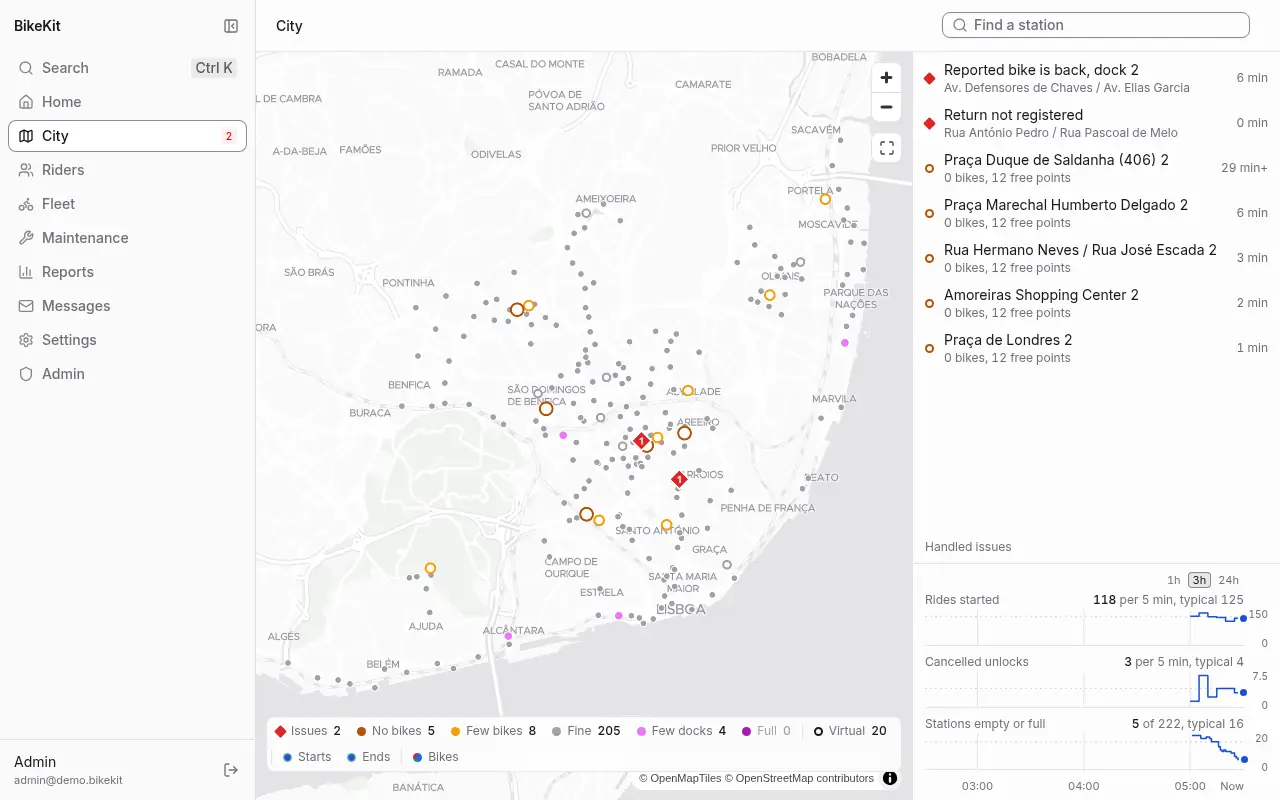
- The backoffice. The website your staff work in: a live map of the city, the fleet, work orders for the technicians, riders and their accounts, prices, messages, reports and settings. It works on a phone too, and it is in Portuguese and English.
- A rider app. A phone app for riders that finds bikes, unlocks them, pauses and ends rides, and handles the wallet, passes and messages. It is a separate project built on the open-source Gira+ app. See The rider app.
- The station and bike protocol. A short, documented HTTP contract between the server and the street hardware: stations report their docks, bikes report where they are, and the server sends unlock and lock commands. Any manufacturer can build to it. When the two disagree, what the station reports wins, and BikeKit records the difference for your staff to look at.
- Open data feeds. Live GBFS for journey planners and map apps, and MDS for the city's mobility data platform. See Open data.
- A simulator. A whole city of simulated stations, bikes, riders and technicians that drives the real server through the same interfaces the real ones use. Use it to try BikeKit before you own a single bike, to train staff, and to test a server before going live.
What it costs
The software costs nothing. You pay for what any scheme needs anyway: bikes and stations, a server to run it on (in tests on a machine held to a Raspberry Pi 4's power, one ran a city of 550 stations and 10,000 bikes with room to spare), hosting, a payment provider, certified invoicing, and push and email providers.
What it does
BikeKit was designed from the requirements of a large European city's public tender for its bike-share system, so it covers what a municipality is usually asked to provide:
- classic and electric bikes, dock stations and virtual stations (marked parking areas with no docks);
- passes, ride tickets, a prepaid wallet, deposits or a direct debit mandate, vouchers, points and refunds;
- legally formatted invoices and credit notes for every sale (Portuguese rules today);
- maintenance with work orders, teams, deadlines (SLAs), shift sheets, vehicles and preventive maintenance plans;
- closures on a schedule, zones drawn on the map, and stations reserved for a company's staff;
- service messages, push and email notifications, email campaigns, badges and referrals;
- reports on usage, stations, the fleet and money, and exports of everything;
- privacy requests under the GDPR, an activity log of every staff action, and accessibility to EN 301 549 (WCAG 2.1 AA) in the backoffice.
Contents
- Getting started: try BikeKit on a laptop with a simulated city, then install it for real.
- Roles: who can do what.
- Using the backoffice: signing in, the home page, finding things, your account and language.
- The city and the fleet: the map, stations, bikes and docks, alerts, closures, zones and equipment states.
- Maintenance: work orders and SLAs, teams, shift sheets, vehicles and maintenance plans.
- Riders and support: finding a rider, issues, refunds, documents, privacy requests and companies.
- Prices and money: rules, passes and tickets, vouchers, the wallet and invoices.
- Messages and rewards: service messages, campaigns, notifications, badges and referrals.
- Reports: usage, stations, fleet and money.
- Administration: staff, integrations and webhooks, export, the activity log and the system page.
- The rider app: what riders see, and how they unlock, pause, return and pay.
- Open data: GBFS and MDS.
- FAQ and glossary.