Por enquanto, este guia está só em inglês.
Support answers riders: a ride that didn't end, a charge that looks wrong, a bike reported stolen, a refund, a document to check, a request for their data. Support, managers and admins work in the Riders section; the issues they share with the control room are on their home page and the City map.
Find a rider
Riders → Riders opens on a search box. Type a name, email, phone number (as the rider reads it out, with or without the country code) or tax number. Below it are the riders you opened recently and the Blocked riders: those suspended or owing money.
Search (Ctrl K) finds riders from any page too, and rides by the ID the rider reads from their receipt.
A rider's page
A rider's page has four tabs, each loading only its own.
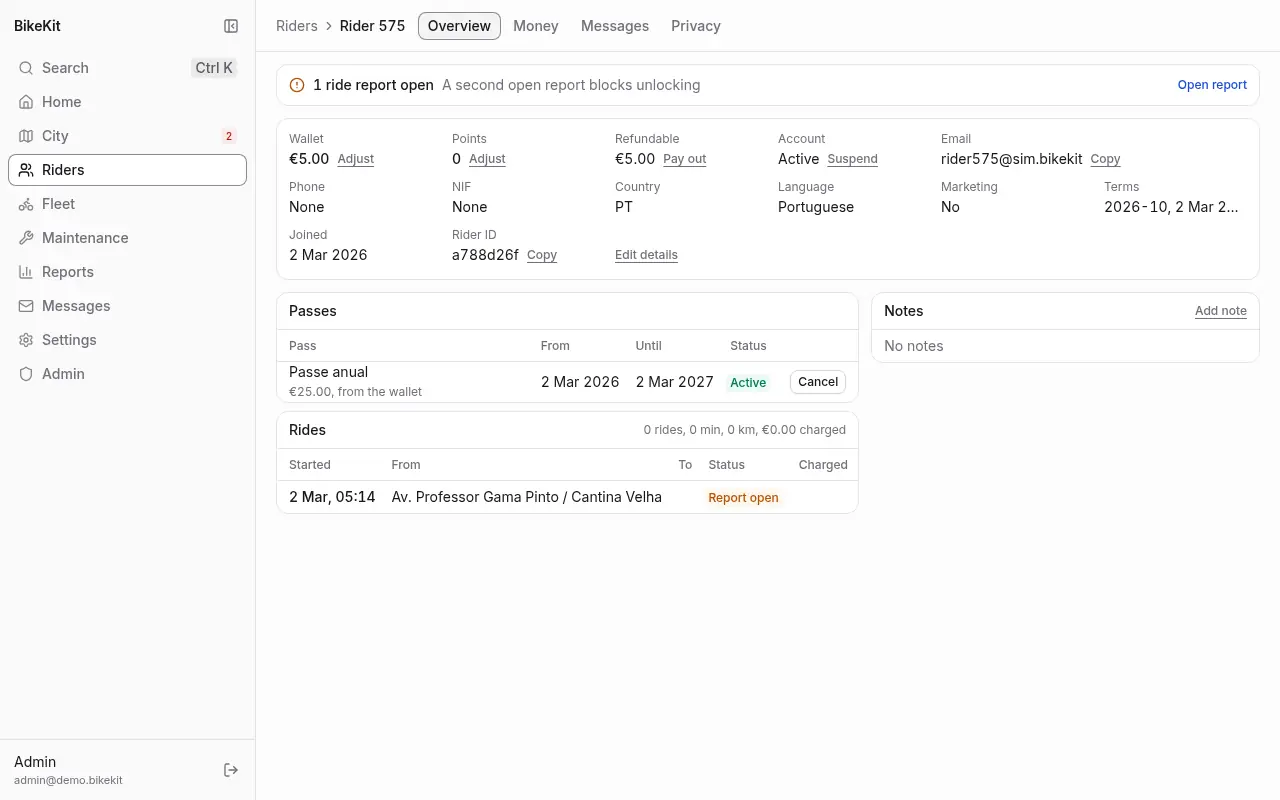
Overview. At the top, the rider's standing: whether they can unlock now and, if not, why (a ride in progress, an open report, a negative balance, no pass, waiting between rides). Then their wallet, points, refundable amount, account, contact details, language and consents, then their passes, rides, documents, badges, riding statistics (rides, time, distance and CO₂ avoided, by month) and Support's Notes. Add note records what happened and what was agreed; notes can't be edited or removed.
Money. The wallet's history beside the points' history, their invoices and credit notes, their saved cards (brand, last four digits, expiry) and their direct debit mandate, if any.
Messages. What notifications the rider takes, by channel; how many phones can get push; the notifications sent to them, each with its state and Resend; and the service messages sent to them, with whether they read them.
Privacy. Their privacy requests (see Privacy requests).
What Support can do from there
| To | Use | Notes |
|---|---|---|
| Give money back to the wallet | Adjust beside the wallet, or Refund on a ride's charge | A negative amount charges the wallet. Every adjustment takes a reason and is invoiced or credited |
| Pay money back to their bank | Pay out beside Refundable | Only money the rider loaded can go back, never voucher or referral credit |
| Add or take away points | Adjust beside the points | Points can't go below zero |
| Cancel a pass | Cancel on the pass | With an optional refund to the wallet of up to its price. Its deposit is released |
| Bring back a cancelled pass | Reactivate | Runs until its original end |
| Keep a deposit | Keep deposit | For a lost or damaged bike: part or all of the day pass's card deposit |
| Collect by direct debit | Collect by debit | The same, for a rider who signed a mandate instead of a deposit |
| End a mandate | End on the Money tab | |
| Remove a saved card | Remove on the Money tab | The payment provider forgets it |
| Correct their details | Edit details | Name, phone, country, tax number, marketing consent, language |
| Stop them riding | Suspend | With a reason. A ride in progress carries on. Unsuspend rider to undo |
| Write to them | Send message on the Messages tab | They get a push notification and see it in the app |
Every one of these asks for a reason and appears in the activity log.
Rides
Riders → Rides opens on the rides that need a look: open ride reports, rides rated two stars or fewer, and the rides running longest now. Find any ride by its ID, the rider or the bike.
A ride's page shows the rider, bike, where and when it started and ended, its billing, its route on a map, its pauses, any calls for help, the rider's rating and comment, and fault photos. From it:
- End ride ends a ride in progress now, billing up to now and marking the bike missing, for a ride that will never end by itself (the bike is gone, the station is down). Only a dock ends a ride otherwise.
- Settle report, on a ride whose bike was reported lost or whose return didn't register: Waive closes it with nothing billed, Charge bills it up to when it was reported.
False starts (rides under three minutes that end at the station they started from) cost nothing and earn nothing. They are kept and shown here, but hidden from the rider's history.
Documents
Some things need a checked document: the student pass needs a student card, and a direct debit mandate needs an identity document. Riders send photos from the app.
Riders → Documents is the queue, oldest first.
- Check opens the document's pages. Each look is recorded, so they load only then.
- Verify, optionally until a date (a student card ends with its school year), or Reject with a reason, which the rider gets by email and push.
The decision is kept; the images are deleted 30 days after it.
Privacy requests
Riders have the right to a copy of everything held about them, and to close their account (GDPR). A request comes from the app, or Support files one on the rider's behalf after a letter or a call, from the rider's Privacy tab: File request for a copy or File closure request. Requests must be answered within 30 days.
Riders → Privacy requests lists the open ones by deadline, overdue ones marked, with anything blocking a closure now.
- A copy of their data. Make available builds it and emails the rider, who downloads it from the app for 30 days. Download gets it yourself, to send another way.
- Closing the account. Close account is refused while a ride is open or disputed or the rider owes money; the request shows what blocks it. Closing cancels running passes, pays the money they loaded back to their bank, forfeits voucher credit and points, and removes their personal data. Rides and payments stay, with nothing that links them to a person, for the legal retention period.
- Refuse, with a reason the rider gets by email, for a request you can't answer.
Companies
Some stations can be reserved for a company's people: a hospital, a campus, a business park. Anyone may return a bike there, but only the company's people can take one.
Riders → Companies lists them with their email domain, people and stations. A company's members are riders whose email is at its domain, plus anyone added by hand.
- Managers create a company with New company, set its name and Email domain (leave it empty to admit only people added by hand), choose its stations one by one or with Add a zone's stations, and Archive it when the arrangement ends.
- Support adds a rider by their email and removes people.
Email addresses aren't verified when riders sign up, so an email domain trusts what the rider typed. If that isn't enough, leave the domain empty and add people by hand, or have the company's own system open their accounts through an API client.