Por enquanto, este guia está só em inglês.
Bikes break, docks jam and stations run empty. Every such job is a work order, routed to a team, measured against a deadline, and closed by the technician who did it. The control room (operators) runs the orders; managers set up the teams, deadlines and plans; technicians (workers) do the work from a phone. Support reads the orders and adds notes, to answer a rider who asks about a fault they reported.
Work orders
Maintenance → Work orders lists the unfinished orders. Filter by state, kind, source, priority, team and deadline, or search for a bike, station or fault. Each row shows where the job is, who has it, its priority, its deadline and its state.
Kinds of order, and where they come from:
| Kind | Opened by |
|---|---|
| Rider report | A rider reporting a fault from the app, with up to three photos |
| Dock fault | A dock reporting a fault itself, at most one open per dock |
| Rebalancing | A station empty or full for 30 minutes (the Station empty or full alert), at most one open per station; or staff |
| Repair, Inspection | Staff or technicians; a maintenance plan a bike has reached; or an equipment state rule |
States. An order is Waiting (nobody has it), Assigned (a person has it), In progress, then Done or Cancelled. An assigned or started order can be put on hold, with a reason: Waiting for parts, No access, Needs the workshop or Other. Holding doesn't stop the deadline.
Priority is High, Normal or Low: as chosen, otherwise the fault's usual priority, otherwise normal.
Open an order
- Maintenance → Work orders → New order (or New work order on a bike's or station's page).
- Choose what it's about: A bike (by the label on its frame), A dock or The station, and the station.
- Choose its kind, the fault from the catalogue if you know it, and its priority.
- Choose who has it, or leave it to the team whose area holds the station.
- Add what to look at, and Open order.
Work an order
An order's page shows its facts with Navigate links (Google Maps and Waze) to where the job is, its two deadlines and how late it is, its crew, its notes, a rider's photos if any, and its history.
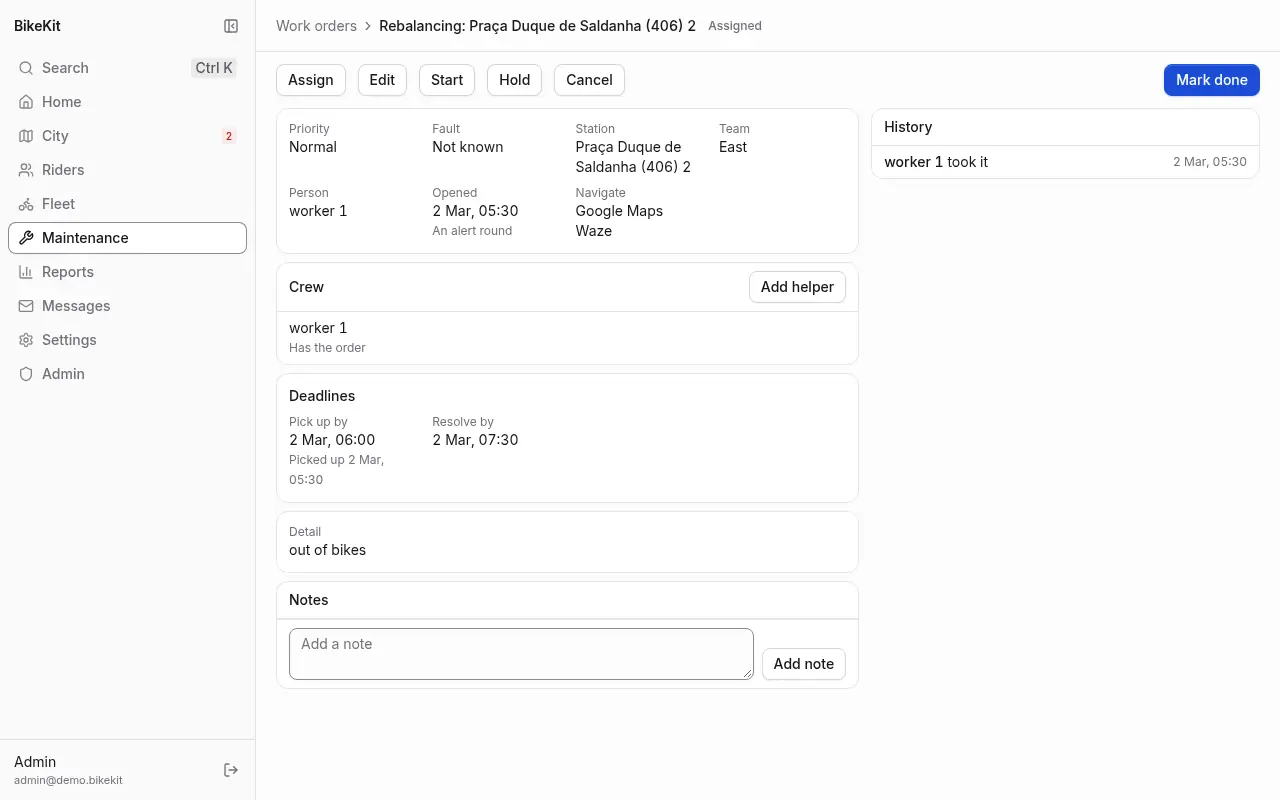
The control room's buttons:
- Assign gives it to a person, or back to nobody.
- Edit changes its priority, fault and detail. A new priority recomputes its deadlines from when it opened.
- Start, Hold and Resume move it on behalf of whoever is doing it.
- Mark done closes it, with the fault found and what was done.
- Cancel (with a reason) drops an order that isn't needed; Reopen brings a finished one back.
- Add helper adds people to the crew, for a van crew or a heavy job. Everyone's time on the order is counted while it is in progress and not on hold.
- Add note leaves a note anyone reading the order sees, finished or not.
A rebalancing order isn't closed by itself when the station recovers, because riders often settle a station before the van arrives: the person who moved the bikes marks it done.
Deadlines (SLAs)
Each kind and priority of order has two targets: minutes to pick up (a named person has it) and minutes to resolve (done). An order takes its deadlines when it opens, so changing a target doesn't move orders already open.
Maintenance → SLA shows, for the last day, week or month, how many orders were opened, picked up in time and resolved in time, the median times, and how many are overdue now, overall and by kind, priority, team and person, with everyone's time on orders. Managers change the targets there with Change targets: a grid of minutes by kind and priority.
An order shows On time, Due soon (in the last quarter of its window), Overdue, then Met target or Missed target. An overdue order also raises the Work order overdue alert on its bike or station.
Teams
A team has people (technicians and operators) and an area: a set of stations. An order opened at a station goes to the team whose area holds it, so set the areas once and routing looks after itself.
On Maintenance → Teams, managers use New team, then add people and stations, one by one or with Add a city zone's stations. A station belongs to one team at most; adding it to one team takes it from another. A team with no unfinished orders can be archived. The list shows each team's open and overdue orders.
Shift sheets
A technician opens a shift sheet when their shift starts: their team, their vehicle and its odometer, the tools they took and any damage they found on the vehicle. A van's second crew member joins the same sheet. One of them ends it for everyone with the odometer at the end and anything to report. Orders done and time spent during the shift are recorded on it.
Technicians open and end their sheets from their home in the backoffice (see For technicians), or from a technician app through the server's worker interface. Joining a colleague's sheet is the app's for now.
Maintenance → Shift sheets lists sheets by day, team, vehicle and whether still open, with crew, kilometres driven, orders done and time on them, flagging damage. A sheet's page shows its crew, orders, the stations visited and its team's area. The control room ends a sheet left open with End shift, giving the odometer if known.
Vehicles
Maintenance → Vehicles is the list of vans, cars, cargo bikes and motorbikes, with each odometer, whether it is out on a shift, and the last damage reported. Managers add one with New vehicle (plate, name, kind and odometer), edit it, and retire it when it leaves the fleet. Each shift that ends with a higher odometer moves it on.
Maintenance plans
A maintenance plan opens preventive work before a part wears out: brake pads every 1,500 km or 600 rides, tyres every 3,000 km or 365 days, a general inspection every 90 days. BikeKit comes with six example plans; adjust them to your manufacturer's schedule.
Settings → Maintenance plans lists each plan with its limits, the bikes it covers, and how many bikes are due or due soon. Managers add one with Add plan:
- Name the component or check.
- Choose the bikes it covers: every bike, classic bikes or electric bikes.
- Set any limits: every so many kilometres, rides or days. The first limit reached makes the bike due.
- Choose what to open (an inspection or a repair), the fault, and the priority.
A bike's usage counts from its last service for that plan. When it reaches a limit, a preventive order opens for it by itself, and completing that order counts as the service. Mark serviced on the bike's page records a service done another way. Filter work orders by the source Preventive to see them.
Fault catalogue
Settings → Fault catalogue is the list of faults that orders name: a code, a label, what it applies to (bike, dock or station) and its usual priority. BikeKit comes with twenty-one common ones. The control room reads it. Managers add faults with Add fault, and take one Off the list rather than deleting it, so old orders keep their meaning.
For technicians
Technicians (the Worker role) sign in to the backoffice on their phone and see only their own work.
Their home shows their team and current shift, with Start shift or End shift and New work order beside it, then:
- My orders, the one in progress first, then by deadline, each with Navigate (opens Google Maps with directions) and Start or Mark done;
- To take in my teams, the orders nobody has, by priority then deadline, each with Take.
Tapping an order opens it: where it is, with Google Maps and Waze links, the fault, priority, deadline and how late, a rider's photos, the notes, and the bike's other orders. The buttons are those the person may use:
- Take, Start, Hold (with a reason) and Resume;
- Give back, with a reason, to return it to the team's queue;
- Mark done, with the fault found and a note;
- Help on it and Stop helping, on a colleague's order;
- Add note.
Start shift opens their shift sheet: their team (when they are in more than one), the vehicle they take, or No vehicle for a round on foot, its odometer, which starts at the vehicle's last reading, any damage found on it, and the tools they carry, separated by commas. A vehicle already on a colleague's sheet is marked On a sheet now; starting with it is refused, since a second crew member joins that sheet instead. End shift ends the sheet for everyone on it, with the odometer at the end and any damage done or found.
A technician who finds a fault where there is no order opens one with New work order: a repair, an inspection or rebalancing; on a bike, by the label on its frame, or on a station or one of its docks, with the stations in their zone first; the fault if they know it, High priority if it can't wait, and a detail. I'll take it (ticked) gives it to them at once and opens it; unticked, it goes to the zone's team like any order. A technician never routes an order to someone else, and can raise a priority but never lower it. Cancelling is the control room's.